rabbitmq消息队列
centos下yum安装RabbitMQ
1 2 3 4 5 6 7 8 9 10 11 12 13 14 15 16 17 18 19 20 21 22 23 24
| 1.安装前准备 wget http://dl.fedoraproject.org/pub/epel/6/x86_64/epel-release-6-8.noarch.rpm rpm -ivh epel-release-6-8.noarch.rpm wget -P /etc/yum.repos.d/ http://repos.fedorapeople.org/repos/peter/erlang/epel-erlang.repo yum clean all yum -y install erlang 2.安装rabbitmq rpm --import http://www.rabbitmq.com/rabbitmq-signing-key-public.asc wget http://www.rabbitmq.com/releases/rabbitmq-server/v2.8.5/rabbitmq-server-2.8.5-1.noarch.rpm rpm -ivh rabbitmq-server-2.8.5-1.noarch.rpm 3.启动rabbitmq并设置开机启动 chkconfig rabbitmq-server on /sbin/service rabbitmq-server start 或者systemctl start rabbitmq-server start 4.检查rabbitmq是否启动 ps aux|grep rabbitmq 或者 systemctl status rabbitmq-server
|
python的队列 queue
1 2 3 4
| q=queue.Queue() q.put() q.qsize() q.get()
|
先进先出
消息队列解决的问题:
- 解耦 天然的解耦
- 异步
优点:解决排队问题
缺点:不能保证任务及时执行
应用场景:飞机购票
同步:
优点:保证任务及时执行
缺点:排队问题
大并发
Web nginx 10000-20000
pv = page visit
一亿的pv用10台server 集群
pv分散到实际的用户上并不多
uv = user visit
队列的作用:
引入rabbitmq的原因:
python只能在同一进程中起作用,不能跨进程
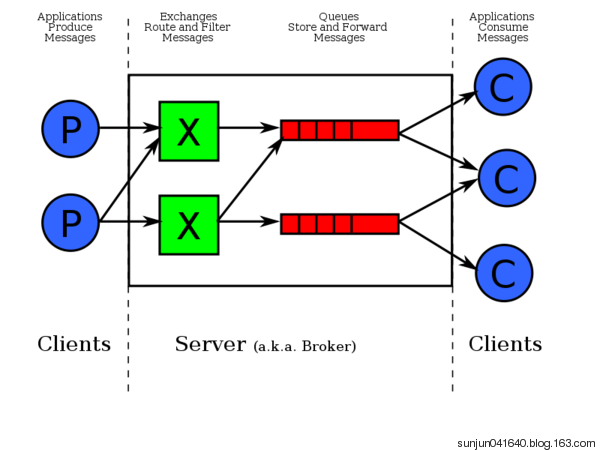
生产者消费者模型
解决了耦合性,生产者和消费者之间没有直接的联系
其中最重要的就是队列
RabbitMQ 配置
在python中安装pika,pip install pika,通过pika连接rabbitmq
远程连接rabbitmq server的话,需要配置权限
rabbitmq 创建用户和设置权限
- 首先在rabbitmq server上创建一个用户
rabbitmqctl add_user aaa 密码
- 同时还要配置权限,允许从外面访问
rabbitmqctl set_permissions -p / aaa “.“ “.“ “.*”
1 2 3 4 5 6 7 8 9 10 11 12 13 14 15 16
| set_permissions [-p vhost] {user} {conf} {write} {read} vhost The name of the virtual host to which to grant the user access, defaulting to /. ,默认是 / user The name of the user to grant access to the specified virtual host. conf A regular expression matching resource names for which the user is granted configure permissions. write A regular expression matching resource names for which the user is granted write permissions. read A regular expression matching resource names for which the user is granted read permissions.
|
客户端连接的时候需要配置认证参数
1 2 3
| credentials = pika.PlainCredentials('aaa', '密码') connection = pika.BlockingConnection(pika.ConnectionParameters('10.211.55.5',5672,'/',credentials)) channel = connection.channel()
|
RabbitMQ 都能为程序提供队列
Exchange 负责消息过滤
RabbitMQ的默认端口是5672
rabbitmpctl list_queues 显示当前的队列列表
生产者:
端口 ip 认证信息
创建队列
向队列发送消息
消费者
端口 ip 认证信息
从指定的队列中取消息
1 rabbitmq的路由routing_key
发送消息:
routing_key = ‘hello’ 把消息队列转到和hello
获取消息:
callback
channel.start_consuming() # 阻塞模式
2 实现最简单的队列
生产者:
1 2 3 4 5 6 7 8 9 10 11
| import pika credentials = pika.PlainCredentials('aaa', '123') parameters = pika.ConnectionParameters(host="192.168.11.144", credentials=credentials) connection = pika.BlockingConnection(parameters) channel = connection.channel() channel.queue_declare(queue='hello') channel.basic_publish(exchange='', routing_key='hello', body='server hello world') print('server send "hello world"') connection.close()
|
消费者:
1 2 3 4 5 6 7 8 9 10 11 12 13 14 15 16 17
| import pika credentials = pika.PlainCredentials('aaa', '123') parameters = pika.ConnectionParameters(host="192.168.11.144", credentials=credentials) connection = pika.BlockingConnection(parameters) channel = connection.channel() def callback(ch, method, properties, body): print("Recived %r" % ch, method, properties, body) channel.basic_consume(callback, queue='hello', no_ack=True ) print("waiting for message") channel.start_consuming()
|
3 如何保证队列中的消息被处理完毕
没有处理完,应该返回队列,上面的代码中,如果消费者客户端挂了,或者在处理的过程中停止了,没有处理完毕,同时队列中也没有了。
3.1 消费者端:
- no_ack = True 消息处理后,不向rabbit-server确认消息已消费完毕
删除这个参数,rabbit-server的消息队列中会一致存在数据

解决rabbit-server中消息被消费后数据还存在的情况,用basic_ack(delivery_tag=method.delivery_tag)
通过这两个参数,同时保证了消费者能够消费完数据不挂,同时消费完后rabbit-server收到消费完的消息把被消费的数据删除
1 2 3 4 5 6 7 8 9 10 11 12 13 14 15 16 17 18 19 20
| import pika import time credentials = pika.PlainCredentials('aaa', '123') parameters = pika.ConnectionParameters(host="192.168.11.144", credentials=credentials) connection = pika.BlockingConnection(parameters) channel = connection.channel() def callback(ch, method, properties, body): time.sleep(10) print("Recived %r" % ch, method, properties, body) ch.basic_ack(delivery_tag=method.delivery_tag) channel.basic_consume(callback, queue='hello', ) print("waiting for message") channel.start_consuming()
|
3.2 rabbitmq-server 保持持久 durable=True
rabbitmq-server重启后,所有的消息就都丢失了
保持队列持久化 durable = True,在队列开始的时候声明,不能对已经生成的队列进行设置,重新对一个队列进行设置。
- 通过参数delivery_mode = 2 把消息变成持久化的
- 即便是rabbitmq服务重启后,也不会丢消息
1 2 3 4 5 6 7 8 9 10 11 12 13 14 15 16 17
| import pika credentials = pika.PlainCredentials('aaa', '123') parameters = pika.ConnectionParameters(host="192.168.11.144", credentials=credentials) connection = pika.BlockingConnection(parameters) channel = connection.channel() channel.queue_declare(queue='hello222',durable=True) channel.basic_publish(exchange='', routing_key='hello222', body='server hello world', properties=pika.BasicProperties( delivery_mode=2, ) ) print('server send "hello world"') connection.close()
|
4 多个消费者的时候(消费者的公平分发)

轮询获取队列中的数据,如果有一个消费者处理慢了,其他的消费者需要一直等着
解决方案,消费者先处理完,先获得数据
在消费者开始消费之前,加上perfetch_count=1
1 2 3 4 5 6 7 8 9 10 11 12 13 14 15 16 17 18 19 20 21
| import pika import time credentials = pika.PlainCredentials('aaa', '123') parameters = pika.ConnectionParameters(host="192.168.11.144", credentials=credentials) connection = pika.BlockingConnection(parameters) channel = connection.channel() def callback(ch, method, properties, body): time.sleep(10) print("Recived %r" % ch, method, properties, body) ch.basic_ack(delivery_tag=method.delivery_tag) channel.basic_qos(prefetch_count=1) channel.basic_consume(callback, queue='hello222', ) print("waiting for message") channel.start_consuming()
|
5 消息发布订阅Publish\Subscribe(消息发布\订阅) rabbit广播 组播 消息过滤(exchange)
之前的消息发送都是一对一的发送和接收,如果想所有的都能接收到,类似广播的效果,用到了exchange
订阅必须绑定并在线
exchange在定义的时候是有类型的,以决定哪些queue符合条件,可以接收消息。
exchange 的消息类型:
fanout: 所有bind到此exchange的queue都可以接收消息
direct: 通过routingKey和exchange决定的那个唯一的queue可以接收消息
topic:所有符合routingKey(此时可以是一个表达式)的routingKey所bind的queue可以接收消息
- fanout 广播 所有的队列都绑定到exchange,需要声明一个名字 不需要routing_key
生产者和消费者端都要声明
生产者启动的时候,生产者没有启动的情况
自动生成队列 消费后删除
exclusive=True唯一的
rabbit 随机生成一个名字
广播:新浪微博 只有当前登录的才收到

广播发送端
运行的时候加参数 Python3 producer.py info
1 2 3 4 5 6 7 8 9 10 11 12 13 14 15 16 17 18 19
| import pika import sys credentials = pika.PlainCredentials('aaa', '123') parameters = pika.ConnectionParameters(host='192.168.43.20', credentials=credentials) connection = pika.BlockingConnection(parameters) channel = connection.channel() channel.exchange_declare(exchange='logs',type='fanout') message = ' '.join(sys.argv[1:]) or "info:Hello World" channel.basic_publish( exchange = 'logs', routing_key='', body = message ) print("send %r"%message) connection.close()
|
广播接收端
1 2 3 4 5 6 7 8 9 10 11 12 13 14 15 16 17 18 19 20 21 22 23
| import pika credentials = pika.PlainCredentials('aaa', '123') parameters = pika.ConnectionParameters(host='192.168.43.20', credentials=credentials) connection = pika.BlockingConnection(parameters) channel = connection.channel() channel.exchange_declare(exchange='logs', type='fanout') queue_obj = channel.queue_declare(exclusive=True) queue_name = queue_obj.method.queue print('queuename',queue_name,queue_obj) channel.queue_bind(exchange='logs',queue=queue_name) print("witing for logs") def callback(ch,method,properties,body): print("%s"%body) channel.basic_consume(callback,queue=queue_name,no_ack=True) channel.start_consuming()
|
发什么类型的,什么类型的接收,在接收端运行的时候加参数,指定接收的类型
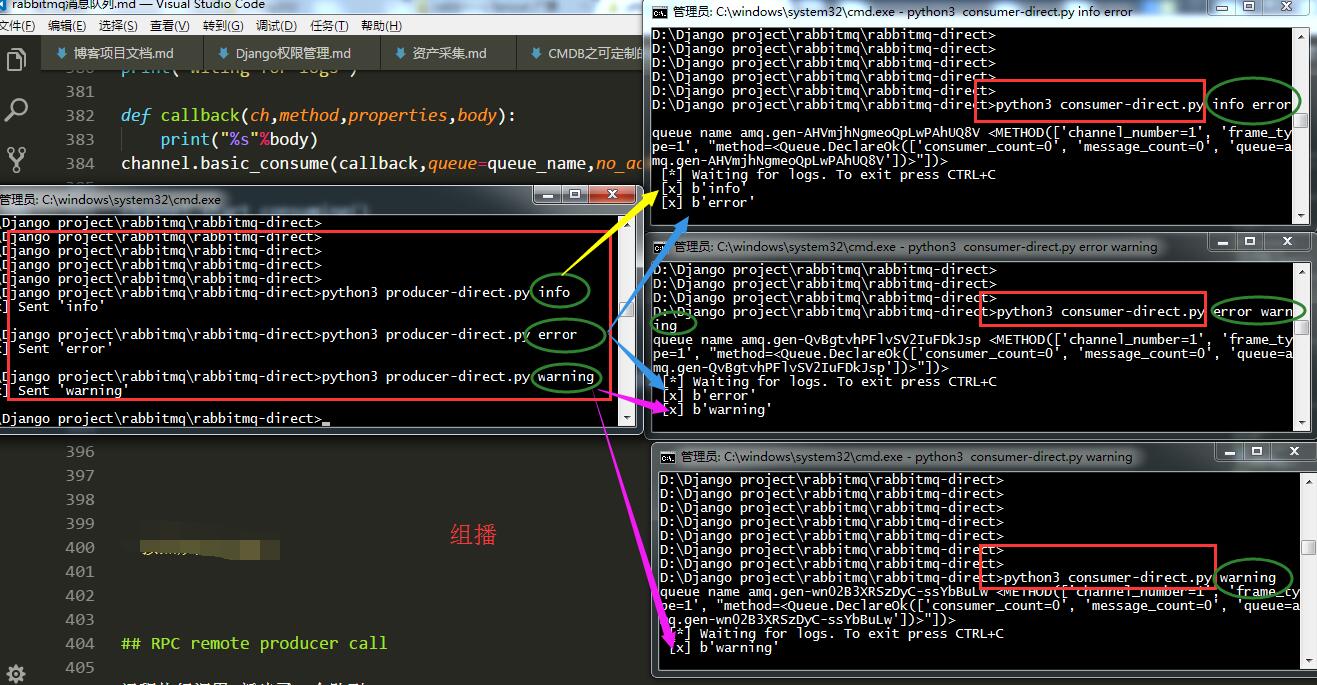
发送端
1 2 3 4 5 6 7 8 9 10 11 12 13 14 15 16 17 18 19 20 21 22 23 24 25 26 27 28 29 30 31 32 33 34 35
| import pika import sys credentials = pika.PlainCredentials('aaa', '123') parameters = pika.ConnectionParameters(host='192.168.43.20', credentials=credentials) connection = pika.BlockingConnection(parameters) channel = connection.channel() channel.exchange_declare(exchange='direct_log',type='direct') log_level = sys.argv[1] if len(sys.argv) > 1 else 'info' message = ' '.join(sys.argv[1:]) or "info: Hello World!" channel.basic_publish(exchange='direct_log', routing_key=log_level, body=message) print(" [x] Sent %r" % message) connection.close()
|
接收端
1 2 3 4 5 6 7 8 9 10 11 12 13 14 15 16 17 18 19 20 21 22 23 24 25 26 27 28 29 30 31 32
| import pika import sys credentials = pika.PlainCredentials('aaa', '123') parameters = pika.ConnectionParameters(host='192.168.43.20', credentials=credentials) connection = pika.BlockingConnection(parameters) channel = connection.channel() queue_obj = channel.queue_declare( exclusive=True) queue_name = queue_obj.method.queue print('queue name', queue_name, queue_obj) log_levels = sys.argv[1:] if not log_levels: sys.stderr.write("usage %s" % sys.argv[0]) sys.exit(1) for level in log_levels: channel.queue_bind( exchange='direct_log', queue=queue_name, routing_key=level ) print(' [*] Waiting for logs. To exit press CTRL+C') def callback(ch, method, properties, body): print(" [x] %r" % body) channel.basic_consume(callback, queue=queue_name, no_ack=True) channel.start_consuming()
|
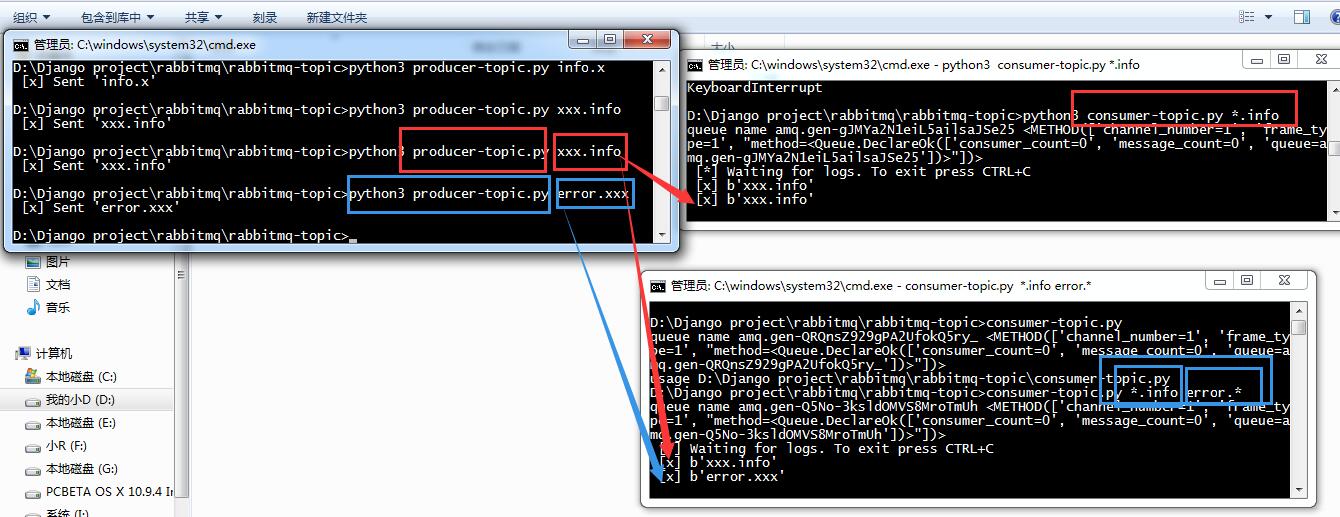
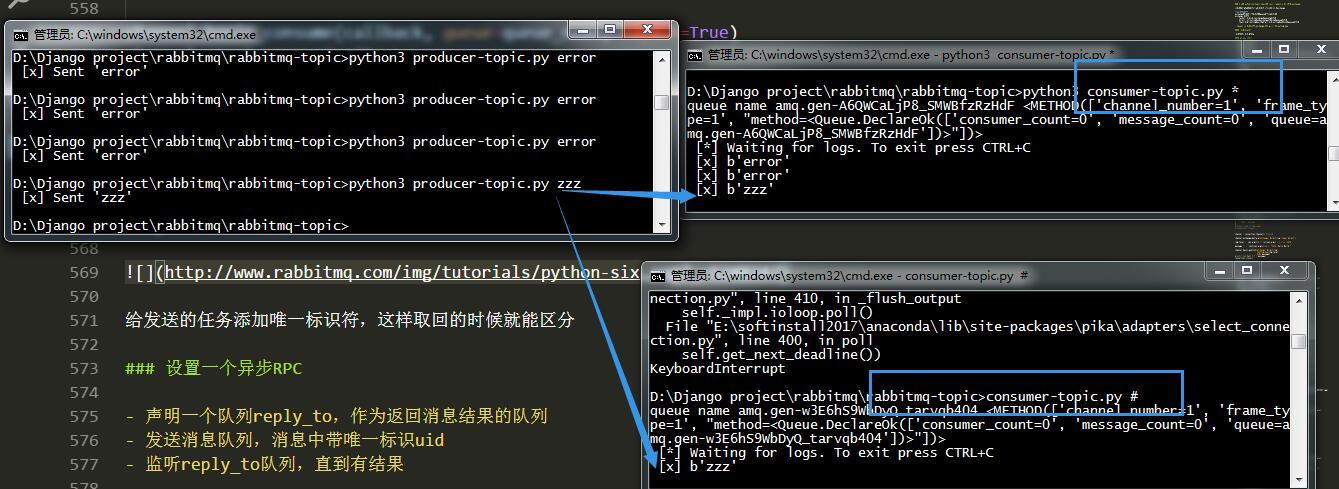
可以根据正则进行更精确的匹配
1 2 3 4 5 6 7 8 9 10 11 12 13 14 15 16 17 18
| python topic_sonsumer.py *.info python topic_sonsumer.py *.error mysql.* python topic_sonsumer.py '#'
|
发送端
1 2 3 4 5 6 7 8 9 10 11 12 13 14 15 16 17 18 19 20 21 22
| import pika import sys credentials = pika.PlainCredentials('aaa', '123') parameters = pika.ConnectionParameters(host='192.168.11.144', credentials=credentials) connection = pika.BlockingConnection(parameters) channel = connection.channel() channel.exchange_declare(exchange='topic_log',type='topic') log_level = sys.argv[1] if len(sys.argv) > 1 else 'info' message = ' '.join(sys.argv[1:]) or "info: Hello World!" channel.basic_publish(exchange='topic_log', routing_key=log_level, body=message) print(" [x] Sent %r" % message) connection.close()
|
接收端
1 2 3 4 5 6 7 8 9 10 11 12 13 14 15 16 17 18 19 20 21 22 23 24 25 26 27 28 29 30 31
| import pika import sys credentials = pika.PlainCredentials('aaa', '123') parameters = pika.ConnectionParameters(host='192.168.11.144', credentials=credentials) connection = pika.BlockingConnection(parameters) channel = connection.channel() queue_obj = channel.queue_declare( exclusive=True) queue_name = queue_obj.method.queue print('queue name', queue_name, queue_obj) log_levels = sys.argv[1:] if not log_levels: sys.stderr.write("usage %s" % sys.argv[0]) sys.exit(1) for level in log_levels: channel.queue_bind( exchange='topic_log', queue=queue_name, routing_key=level ) print(' [*] Waiting for logs. To exit press CTRL+C') def callback(ch, method, properties, body): print(" [x] %r" % body) channel.basic_consume(callback, queue=queue_name, no_ack=True) channel.start_consuming()
|
RPC remote producer call
不知道你有没有发现,上面的流都是单向的,如果远程的机器执行完返回结果,就实现不了了。
如果返回,这种模式叫什么呢,RPC(远程过程调用),snmp就是典型的RPC
RabbitMQ能不能返回呢,怎么返回呢?既是发送端又是接收端。
但是接收端返回消息怎么返回?可以发送到发过来的queue里么?不可以。
返回时,再建立一个queue,把结果发送新的queue里
为了服务端返回的queue不写死,在客户端给服务端发指令的的时候,同时带一条消息说,你结果返回给哪个queue

task1,task2异步执行,但是返回的顺序是不固定的,为了区分是谁执行完的,在发送的任务添加唯一标识符,这样取回的时候就能区分
设置一个异步RPC
- 声明一个队列reply_to,作为返回消息结果的队列
- 发送消息队列,消息中带唯一标识uid
- 监听reply_to队列,直到有结果
在类中声明监听
发送端
1 2 3 4 5 6 7 8 9 10 11 12 13 14 15 16 17 18 19 20 21 22 23 24 25 26 27 28 29 30 31 32 33 34 35 36 37 38 39 40 41 42 43 44 45 46 47 48 49 50 51 52 53 54
| import subprocess import pika import time credentials = pika.PlainCredentials('aaa', '123') parameters = pika.ConnectionParameters(host='192.168.11.144', credentials=credentials) connection = pika.BlockingConnection(parameters) channel = connection.channel() channel.queue_declare(queue='rpc_queue2') def fib(n): if n == 0: return 0 elif n == 1: return 1 else: return fib(n - 1) + fib(n - 2) def run_cmd(cmd): cmd_obj = subprocess.Popen(cmd, shell=True, stdout=subprocess.PIPE, stderr=subprocess.PIPE) result = cmd_obj.stdout.read() + cmd_obj.stderr.read() return result def on_request(ch, method, props, body): cmd = body.decode("utf-8") print(" [.] run (%s)" % cmd) response = run_cmd(cmd) ch.basic_publish(exchange='', routing_key=props.reply_to, properties=pika.BasicProperties(correlation_id= \ props.correlation_id), body=response) ch.basic_ack(delivery_tag=method.delivery_tag) channel.basic_consume(on_request, queue='rpc_queue2') print(" [x] Awaiting RPC requests") channel.start_consuming()
|
接收端
1 2 3 4 5 6 7 8 9 10 11 12 13 14 15 16 17 18 19 20 21 22 23 24 25 26 27 28 29 30 31 32 33 34 35 36 37 38 39 40 41 42 43 44 45 46 47 48 49 50 51 52 53 54 55 56 57 58 59
| import queue import pika import uuid class CMDRpcClient(object): def __init__(self): credentials = pika.PlainCredentials('aaa', '123') parameters = pika.ConnectionParameters(host='192.168.11.144', credentials=credentials) self.connection = pika.BlockingConnection(parameters) self.channel = self.connection.channel() result = self.channel.queue_declare(exclusive=True) self.callback_queue = result.method.queue self.channel.basic_consume(self.on_response, no_ack=True, queue=self.callback_queue) def on_response(self, ch, method, props, body): """ 收到服务器端命令结果后执行这个函数 :param ch: :param method: :param props: :param body: :return: """ if self.corr_id == props.correlation_id: self.response = body.decode("gbk") def call(self, n): self.response = None self.corr_id = str(uuid.uuid4()) self.channel.basic_publish(exchange='', routing_key='rpc_queue2', properties=pika.BasicProperties( reply_to=self.callback_queue, correlation_id=self.corr_id, ), body=str(n)) while self.response is None: self.connection.process_data_events() return self.response cmd_rpc = CMDRpcClient() print(" [x] Requesting fib(30)") response = cmd_rpc.call('ipconfig') print(response)
|
参考:
http://blog.csdn.net/fgf00/article/details/52872730
http://www.cnblogs.com/alex3714/articles/5248247.html